AI Misinformation: How to Identify Fake AI Content
📰 A Practical Guide to Recognizing AI-Generated False Information, Images, Videos, and News
AI Misinformation:
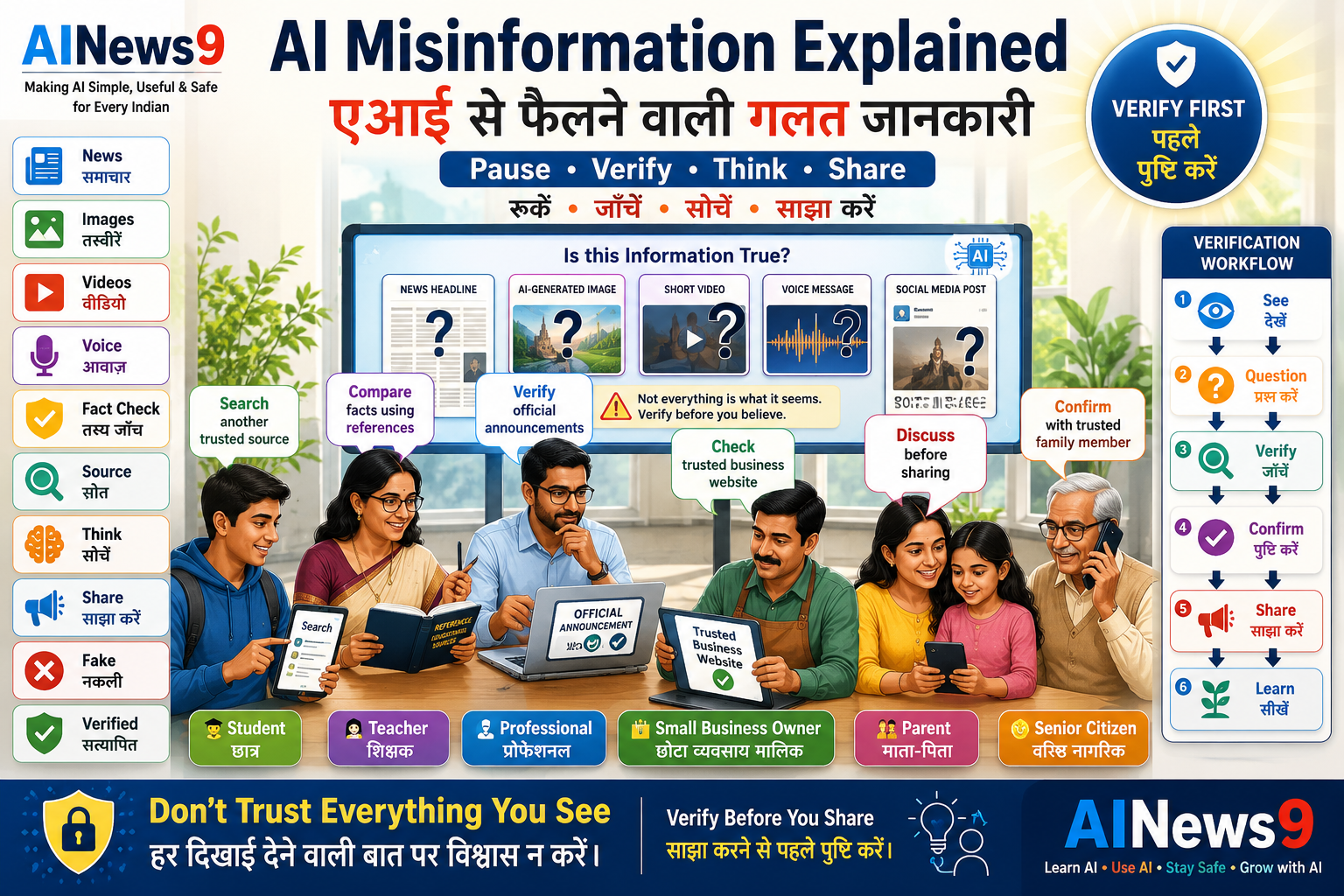
Artificial Intelligence can create realistic text, images, videos, and audio in seconds. While these tools have many positive uses, they can also be used to spread false or misleading information. Learning how to recognize AI-generated misinformation is now an essential digital skill. In this guide, you’ll discover how AI misinformation spreads, learn to identify warning signs, and develop simple habits to verify information before believing or sharing it.
👥 Who Should Read This
This guide is especially useful for:
- 🎓 Students
- 👨👩👧 Parents
- 👩🏫 Teachers
- 💼 Professionals
- 👴 Senior Citizens
- 🏪 Small Business Owners
- 🌐 Anyone who uses social media, messaging apps, or online news
No technical knowledge is required.
📖 What You’ll Learn
By the end of this guide, you’ll be able to:
- Understand what AI misinformation is.
- Learn how AI can create misleading content.
- Identify common warning signs.
- Verify information before sharing it.
- Protect yourself and others from false information.
- Develop responsible digital habits.
📚 In This Guide
📰 What Is AI Misinformation?
AI misinformation refers to false, misleading, or inaccurate content created or amplified using Artificial Intelligence.
This content may look genuine, but it can present incorrect facts, manipulated images, fabricated quotes, or misleading videos as if they were real.
AI misinformation may appear as:
- Fake news articles
- AI-generated images
- Edited videos
- Fake screenshots
- False statistics
- Fabricated quotes
- Misleading social media posts
Sometimes the person sharing the content may not even realize that it is inaccurate.
This is why learning to verify information is more important than ever.
🤖 How AI Can Create Misleading Content
Modern AI tools can generate convincing content within seconds.
While these tools are designed for many helpful purposes, they can also be misused to create misinformation.
Examples include:
📰 Fake News Articles
AI can generate articles that look like professional news reports but contain incorrect or completely fabricated information.
🖼️ Fake Images
AI image generators can create realistic pictures of events that never happened.
These images can easily be mistaken for real photographs if viewed without context.
💬 Fake Quotes
AI can create graphics or screenshots showing famous people appearing to say something they never actually said.
📊 Fake Statistics
AI can generate impressive-looking charts and numbers that may not be based on real research or reliable data.
Always verify statistics before using or sharing them.
📱 Fake Social Media Posts
AI can generate realistic posts, comments, or conversations designed to appear authentic.
Without verification, these posts can spread rapidly across social media platforms.
🌐 Where AI Misinformation Commonly Spreads
False information can appear almost anywhere online.
Common places include:
- WhatsApp forwards
- Facebook posts
- Instagram reels and stories
- X (formerly Twitter)
- YouTube videos
- Telegram groups
- Blogs and websites
- Online discussion forums
The speed of social media allows misinformation to reach thousands—or even millions—of people within minutes.
🚩 Warning Signs of AI Misinformation
Not every surprising story is false, but certain warning signs should encourage you to verify the information before believing or sharing it.
Look for these common indicators:
- Extremely emotional or shocking headlines.
- No reliable source mentioned.
- No publication date.
- Poor grammar or spelling.
- Low-quality or unusual images.
- Claims without supporting evidence.
- Screenshots without links to the original source.
- Requests to “Share Immediately.”
- Statements that sound too good—or too alarming—to be true.
One warning sign doesn’t automatically mean content is false, but several together should make you pause and investigate.
🛡️ VERIFY Before You SHARE™
Before forwarding any AI-generated or online content, remember this simple checklist:
V – Verify the Source
Who originally published the information?
E – Examine the Evidence
Are there reliable facts, references, or official announcements?
R – Read Beyond the Headline
Headlines can be misleading.
Read the complete article before forming an opinion.
I – Investigate Other Trusted Sources
Can you find the same information reported by multiple credible organizations?
F – Fact-Check Before Forwarding
If you cannot verify it, don’t share it.
⚠️ Safety Alert
Sharing false information—even unintentionally—can cause confusion, damage reputations, and spread unnecessary fear. Always verify before you share.
🛡️ AINews9 Safety Tip #1
AI can create convincing content, but it cannot guarantee that the information is true. Your critical thinking remains your strongest defense against misinformation.
✅ Safe Practice
The next time you receive a surprising WhatsApp message or social media post, wait for a few minutes before sharing it.
Search for the same information on trusted news websites or official sources first.
A short pause can help stop misinformation from spreading.
🔍 How to Verify AI-Generated Content
You don’t need to be a technology expert to identify misinformation.
Most false or misleading content can be detected by following a few simple verification steps.
Think of verification as a habit—not a technical skill.
✅ Check the Original Source
Always ask:
- Who published this information?
- Is the website or account trustworthy?
- Does the author have credibility?
Official government websites, educational institutions, reputable news organizations, and recognized experts are generally more reliable than anonymous social media accounts.
If you cannot identify the original source, be cautious.
✅ Read Beyond the Headline
Many misleading posts use dramatic headlines to attract attention.
Before believing or sharing:
- Read the complete article.
- Understand the full context.
- Check whether the headline accurately reflects the content.
A sensational headline does not always tell the complete story.
✅ Compare Multiple Trusted Sources
Don’t rely on a single post or website.
Search for the same information using trusted news organizations or official sources.
If several independent and credible sources report the same facts, the information is more likely to be reliable.
✅ Check the Publication Date
Old news is sometimes shared as if it happened today.
Before reacting, verify:
- Publication date
- Event date
- Context
An old article shared without context can easily create unnecessary confusion.
✅ Look Carefully at Images and Videos
AI-generated visuals are becoming increasingly realistic.
Ask yourself:
- Does anything look unusual?
- Are faces or hands distorted?
- Do lighting and shadows appear natural?
- Is there an official source confirming the image?
Images alone should never be treated as proof.
🛡️ VERIFY Before You SHARE™
When in doubt, remember:
✔ Verify the source
✔ Examine the evidence
✔ Read beyond the headline
✔ Investigate trusted sources
✔ Fact-check before forwarding
These five habits can prevent the spread of misinformation.
🎓 Advice for Students
Students often encounter AI-generated content while researching assignments or preparing for exams.
Develop these habits:
- Verify facts using textbooks.
- Compare AI responses with trusted educational websites.
- Ask teachers when unsure.
- Cite reliable sources in assignments.
- Avoid using unverified statistics.
Learning how to evaluate information is as important as learning the information itself.
👨👩👧 Guidance for Parents
Parents can help children become responsible digital citizens.
Encourage children to:
- Ask questions before believing online content.
- Discuss unusual videos or posts with adults.
- Avoid forwarding unverified messages.
- Learn how to distinguish facts from opinions.
- Use trusted educational resources.
Regular family conversations help build healthy digital habits.
👩🏫 Tips for Teachers
Teachers can strengthen digital literacy by encouraging students to:
- Verify information from multiple sources.
- Discuss how misinformation spreads.
- Analyse real examples of misleading content.
- Practice fact-checking activities.
- Use AI responsibly in research and learning.
Teaching verification skills prepares students for a world where AI-generated content is increasingly common.
💼 Best Practices for Professionals
Professionals should verify information before using it in:
- Presentations
- Reports
- Business proposals
- Client communications
- Research
- Public announcements
Sharing inaccurate information can affect professional credibility.
Always confirm important facts through reliable sources before making decisions.
👴 Helping Senior Citizens Identify Misinformation
Senior citizens are often targeted through misleading WhatsApp messages, forwarded videos, and fake health advice.
Encourage family members to:
- Verify unexpected claims.
- Confirm information with trusted relatives.
- Ignore messages demanding immediate action.
- Avoid forwarding unverified health or financial advice.
Patience and discussion are often the best protection.
⚠️ Safety Alert
Never assume that a message is true simply because it has been forwarded many times or shared by someone you know.
Even well-meaning people can unknowingly spread misinformation.
🛡️ AINews9 Safety Tip #2
The speed of sharing should never be more important than the accuracy of the information being shared.
🌟 Everyday Verification Habits
Build these simple habits into your daily online life:
- Pause before sharing.
- Verify surprising claims.
- Read complete articles.
- Compare multiple sources.
- Check publication dates.
- Question extraordinary statements.
- Encourage others to verify information too.
These habits make you a more responsible digital citizen.
✅ Safe Practice
Before forwarding a message to your family WhatsApp group, spend one minute checking whether the same information appears on a trusted news website or official organization.
That one minute can prevent false information from reaching hundreds of people.
🚫 Common Mistakes That Spread Misinformation
Many people don’t intentionally spread false information.
Instead, misinformation spreads because people act quickly without verifying what they see.
By avoiding a few common mistakes, you can help stop false information from spreading.
| ❌ Common Mistake | ✅ Better Practice |
|---|---|
| Sharing without reading | Read the complete article before sharing. |
| Trusting every forwarded message | Verify the original source first. |
| Believing AI-generated images without checking | Look for official confirmation from trusted sources. |
| Sharing emotional or shocking content immediately | Pause and verify before forwarding. |
| Relying on a single source | Compare information from multiple reliable sources. |
| Assuming AI-generated content is always accurate | Verify important facts independently. |
Remember:
The easiest way to stop misinformation is to avoid becoming part of its spread.
🌟 Best Practices for Responsible Information Sharing
Responsible AI users don’t just consume information—they evaluate it.
Follow these habits whenever you come across surprising or important content.
✅ Pause Before You Share
Many misleading posts are designed to trigger quick emotional reactions.
Before forwarding any message, ask yourself:
- Is this verified?
- Who published it?
- Can I confirm it elsewhere?
A short pause often prevents mistakes.
✅ Verify Important Claims
For topics involving:
- Health
- Finance
- Government announcements
- Education
- Public safety
Always verify information using official sources before acting or sharing it.
✅ Think Critically
AI can generate convincing content, but convincing doesn’t always mean correct.
Develop the habit of asking:
- Does this make sense?
- Is there evidence?
- Could this be manipulated?
- Is the information current?
Critical thinking remains one of the most valuable digital skills.
✅ Help Others Learn
If you discover that a message is false:
- Politely inform friends or family.
- Share trusted sources.
- Explain why the information is inaccurate.
- Encourage verification rather than arguments.
Correcting misinformation respectfully is more effective than criticizing people.
🛡️ AINews9 Safety Tip #3
Every verified fact you share helps build a healthier digital community. Every unverified message can unintentionally spread confusion.
🌍 Building Responsible Digital Habits
Artificial Intelligence makes it easier than ever to create realistic content.
That means responsible users must become better at evaluating information.
Develop these daily habits:
- Verify before believing.
- Read before sharing.
- Question extraordinary claims.
- Use trusted sources.
- Stay curious and keep learning.
- Encourage critical thinking in your family and workplace.
These habits will continue to be valuable as AI technology evolves.
📝 Key Takeaways
Congratulations!
You now understand how AI can create and spread misinformation—and more importantly, how to protect yourself from it.
Remember these key lessons:
- ✅ AI can generate realistic but misleading content.
- ✅ Not everything online is accurate, even if it looks convincing.
- ✅ Verify information using trusted sources.
- ✅ Read beyond headlines.
- ✅ Check publication dates and evidence.
- ✅ Pause before forwarding messages.
- ✅ Encourage family and friends to verify information too.
- ✅ Critical thinking is your strongest defense against misinformation.
❓ Frequently Asked Questions
1. What is AI misinformation?
AI misinformation is false or misleading content that is created or amplified using Artificial Intelligence.
It may include fake news, fabricated quotes, misleading images, edited videos, or inaccurate statistics.
2. Can AI create fake news?
Yes.
AI can generate articles, headlines, and social media posts that appear convincing but may contain false or misleading information.
This is why verification is essential.
3. Are AI-generated images always fake?
No.
Many AI-generated images are created for education, art, entertainment, or design.
The important point is to verify images before treating them as evidence of real events.
4. How can I verify a WhatsApp forward?
Before forwarding:
- Check trusted news websites.
- Look for official announcements.
- Compare multiple reliable sources.
- Be cautious if the message creates urgency or strong emotions.
5. Why do fake posts spread so quickly?
People often share surprising or emotional content without verifying it.
Social media allows misinformation to spread much faster than traditional communication.
6. Should students use AI-generated information in assignments?
Students should use AI to support learning, but they should always verify facts using trusted educational resources before including them in assignments.
7. Can misinformation be shared accidentally?
Yes.
Many people unknowingly forward inaccurate information because they believe it is true.
Verification helps prevent this.
8. What is the simplest rule to remember?
Remember:
Verify Before You Share™
A few extra minutes spent checking information can prevent misinformation from spreading to hundreds—or even thousands—of people.
📚 Trusted Resources
For reliable information and fact-checking, consult trusted sources such as:
- Government websites and official announcements
- Reputable national and international news organizations
- Educational institutions and universities
- Google Fact Check Explorer
- International Fact-Checking Network (IFCN)
- AINews9 Stay Safe Series
Whenever possible, rely on official sources instead of social media forwards.
💬 Final Thoughts
Artificial Intelligence is changing the way information is created and shared.
While AI offers incredible opportunities for learning and creativity, it also makes it easier to produce realistic but misleading content.
The good news is that you don’t need advanced technology to protect yourself.
You simply need good habits:
- Verify before believing.
- Think critically.
- Compare trusted sources.
- Share responsibly.
Remember:
The future belongs not only to people who can use AI—but also to people who can recognize when AI-generated information should be questioned.
By becoming a thoughtful and responsible digital citizen, you help create a safer and better-informed online community.
🎓 Continue Your AI Journey
Continue building your AI knowledge with AINews9.
📘 Learn AI
- L001 – What is Artificial Intelligence?
- L002 – What is Generative AI?
- L003 – What is Machine Learning?
- L004 – What are Large Language Models (LLMs)?
- L005 – What is ChatGPT?
- L006 – What are AI Agents?
- L007 – What is Prompt Engineering?
- L008 – How Does AI Work?
- L009 – History of Artificial Intelligence
- L010 – AI Terminology Explained
🛠️ Use AI
- U001 – How Students Can Use AI Effectively
- U002 – How Teachers Can Use AI in Education
- U003 – How Professionals Can Use AI at Work
- U004 – How Small Businesses Can Use AI
- U005 – Beginner’s Guide to ChatGPT
- U006 – Beginner’s Guide to Gemini
- U007 – Beginner’s Guide to Claude
- U008 – Beginner’s Guide to NotebookLM
- U009 – AI for Everyday Productivity
- U010 – 10 Best AI Tools for Beginners
🛡️ Stay Safe
- S001 – AI Safety for Beginners
- S002 – What Are Deepfakes?
- S003 – AI Scams and How to Avoid Them
- S004 – AI Safety for Children & Parents
- S005 – AI and Data Privacy
- S006 – Safe Prompting Practices
- S007 – AI Misinformation: How to Identify Fake AI Content ✅
- S008 – AI Ethics Explained
- S009 – Responsible AI Use
- S010 – AI Safety Checklist
About AINews9
AINews9 is India’s AI Literacy Platform dedicated to making Artificial Intelligence Simple, Useful & Safe for Every Indian.
We empower:
- 🎓 Students
- 👩🏫 Teachers
- 👨👩👧 Parents
- 💼 Professionals
- 👴 Senior Citizens
- 🏪 Small Business Owners
Through our four learning pillars:
- 📘 Learn AI
- 🛠️ Use AI
- 🛡️ Stay Safe
- 🚀 Grow with AI
Together, we’re helping every Indian build the knowledge, confidence, and critical thinking skills needed to use Artificial Intelligence responsibly in an increasingly digital world.