Safe Prompting Practices: How to Protect Your Privacy While Using AI
💬 A Simple & Practical Guide to Writing Safe AI Prompts Without Exposing Personal or Confidential Information
Safe Prompting Practices:
Every question you ask an AI assistant is called a prompt. While AI can help you learn, work, and solve problems, it’s important to avoid including personal or confidential information in your prompts. A few simple habits can help you protect your privacy while still getting excellent results from AI. In this guide, you’ll learn how to write safe prompts, recognize risky information, and build responsible AI habits for everyday use.
👥 Who Should Read This
This guide is ideal for:
- 🎓 Students
- 👨👩👧 Parents
- 👩🏫 Teachers
- 💼 Professionals
- 👴 Senior Citizens
- 🏪 Small Business Owners
- 🌐 Anyone using ChatGPT, Gemini, Claude, Microsoft Copilot, or other AI assistants
No technical knowledge is required.
📖 What You’ll Learn
By the end of this guide, you’ll be able to:
- Understand what safe prompting means.
- Learn why prompt safety is important.
- Identify information that should never appear in prompts.
- Compare safe and unsafe prompt examples.
- Write prompts that protect your privacy.
- Develop responsible AI habits for personal and professional use.
📚 In This Guide
💬 What Is Safe Prompting?
A prompt is the instruction, question, or request you give to an AI assistant.
For example:
- “Explain photosynthesis in simple words.”
- “Help me write a professional email.”
- “Create a weekly study plan.”
Safe prompting means writing prompts that help AI understand your request without revealing sensitive, personal, or confidential information.
The goal is simple:
Share only the information AI needs to complete your task—nothing more.
This habit protects your privacy while still allowing AI to provide useful answers.
🤔 Why Prompt Safety Matters
Every prompt you write contains information.
Sometimes that information is harmless.
For example:
- General questions
- Learning requests
- Creative writing
- Public information
However, people sometimes include information they don’t realize is sensitive.
Examples include:
- Personal identity details
- Banking information
- Office documents
- Customer records
- Medical reports
- Family information
Once you develop the habit of reviewing your prompts before sending them, you’ll significantly reduce privacy risks.
Think of prompting as having a conversation.
You wouldn’t normally share your ATM PIN, passwords, or confidential office documents with a stranger.
The same careful thinking should apply when interacting with AI.
🧠 Think Before You Prompt
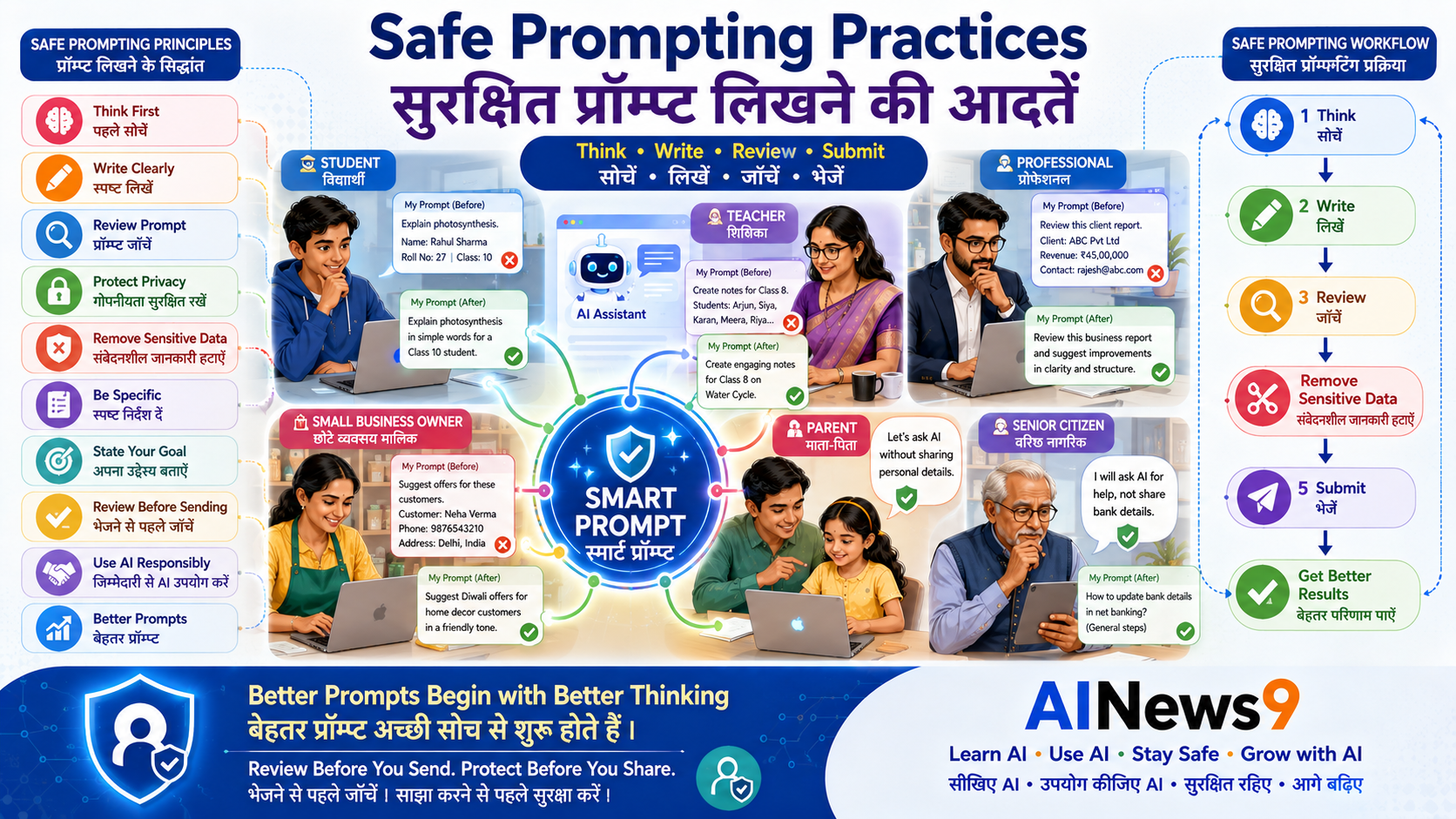
Before clicking Send, ask yourself these five questions:
✅ Is this personal?
✅ Is this confidential?
✅ Does it belong to someone else?
✅ Can I remove names or sensitive details?
✅ Is AI the right tool for this task?
If any answer raises concern, revise your prompt before sending it.
🚫 Information You Should NEVER Include in Prompts
Public AI assistants should never receive highly sensitive information.
Avoid including:
🔑 Login Credentials
- Passwords
- OTPs
- PINs
- Security questions
🏦 Financial Information
- Bank account numbers
- Credit or debit card details
- UPI PINs
- Investment account credentials
🪪 Personal Identity Information
- Aadhaar number
- PAN number
- Passport details
- Driving Licence details
- Voter ID information
🏥 Sensitive Personal Records
- Medical reports
- Insurance documents
- Tax records
- Legal documents
- Personal financial statements
💼 Confidential Business Information
- Customer databases
- Employee records
- Internal reports
- Product designs
- Source code
- Business strategies
- Confidential contracts
If the information could cause harm if exposed, it should not be included in a public AI prompt.
⚠️ Safety Alert
A prompt may seem like a simple question, but it can contain valuable personal or business information. Always review your prompt before sending it.
🛡️ AINews9 Safety Tip #1
Good prompting isn’t only about asking better questions—it’s also about protecting the information you choose to share.
✅ Safe Practice
Instead of entering real personal information, replace it with sample or fictional data.
For example:
❌ “Summarize my bank statement ending in 4589.”
✅ “Summarize this sample monthly budget and suggest ways to save money.”
You will usually receive equally useful guidance without exposing sensitive information.
✅ Safe vs Unsafe Prompt Examples
One of the easiest ways to learn safe prompting is by comparing good and bad examples.
Notice that the goal stays the same, but the safe prompt removes sensitive information.
🏦 Example 1: Banking Information
❌ Unsafe Prompt
“Here is my bank statement. Please analyse my transactions and account number.”
✅ Safer Prompt
“Here is a sample monthly budget. Can you analyse my spending categories and suggest ways to save money?”
💼 Example 2: Office Documents
❌ Unsafe Prompt
“Summarise this confidential client contract.”
✅ Safer Prompt
“Summarise this sample service agreement and explain its key clauses.”
🩺 Example 3: Medical Information
❌ Unsafe Prompt
“Here is my complete medical report. What disease do I have?”
✅ Safer Prompt
“Can you explain what these blood test terms generally mean?”
Always consult a qualified healthcare professional for medical advice.
🎓 Example 4: Student Assignment
❌ Unsafe Prompt
“Write my entire homework so I can submit it.”
✅ Safer Prompt
“Explain this topic in simple language so I can write the answer in my own words.”
AI should help you learn, not do your learning for you.
🏪 Example 5: Business Information
❌ Unsafe Prompt
“Analyse my customer database and tell me which customers spend the most.”
✅ Safer Prompt
“Analyse this anonymous sample sales dataset and identify purchasing trends.”
👨👩👧 Example 6: Personal Information
❌ Unsafe Prompt
“Here are my Aadhaar and PAN details. Fill this application.”
✅ Safer Prompt
“Explain what information is usually required in this type of application.”
🎓 Safe Prompting for Students
Students are among the most frequent users of AI.
Use AI to:
- Understand difficult concepts.
- Practice problem-solving.
- Improve grammar.
- Learn coding.
- Brainstorm ideas.
- Prepare for exams.
Avoid:
- Sharing school login credentials.
- Uploading personal documents.
- Copying AI answers directly into assignments.
- Sharing classmates’ personal information.
Remember:
Learning is more valuable than simply getting the answer.
🏡 Safe Prompting for Families
Parents can teach children simple prompting habits that last a lifetime.
Encourage children to:
- Ask questions instead of sharing personal information.
- Avoid entering family details.
- Never share passwords or OTPs.
- Ask for help when unsure.
- Use AI with adult guidance when appropriate.
Regular conversations build safer digital habits.
💼 Safe Prompting at Work
Many professionals now use AI for:
- Writing emails
- Creating presentations
- Summarising reports
- Brainstorming ideas
- Planning projects
- Coding assistance
Before using AI at work:
- Follow your company’s AI policy.
- Remove confidential information.
- Replace names with placeholders.
- Use sample data whenever possible.
- Confirm that AI is approved for workplace use.
Protecting company information is everyone’s responsibility.
🏪 Safe Prompting for Small Businesses
Small businesses can gain significant productivity benefits from AI while still protecting sensitive information.
Instead of sharing:
- Customer names
- Supplier contracts
- Employee records
- Financial statements
- Pricing strategies
Use:
- Sample customers
- Anonymous financial examples
- Generic contracts
- Fictional business scenarios
This allows AI to provide useful guidance without exposing confidential business information.
🛡️ AINews9 Safe Prompt Checklist
Before every prompt, quickly review this checklist.
✅ Think Before You Prompt
✔ Is this information personal?
✔ Is it confidential?
✔ Does it belong to someone else?
✔ Can I replace names with placeholders?
✔ Can I use sample data instead?
✔ Am I sharing only what is necessary?
✔ Would I be comfortable if this prompt became public?
If you answer No to the last question, revise your prompt before sending it.
⚠️ Safety Alert
Never assume that every AI conversation is completely private. Good prompting begins with protecting your own information.
🛡️ AINews9 Safety Tip #2
The best prompts are clear, specific, and privacy-conscious. A small change in wording can protect your personal information without reducing the quality of the AI’s response.
✅ Safe Practice
Before asking AI to review a document, remove names, account numbers, addresses, phone numbers, and any information that identifies a person or organization.
For example:
- Rahul Sharma → Employee A
- ABC Pvt. Ltd. → Company X
- 9876543210 → XXXXXXXXXX
This simple habit protects privacy while still allowing AI to provide meaningful assistance.
🌟 Best Practices for Safe Prompting
Safe prompting is not about writing complicated prompts.
It’s about developing simple habits that protect your privacy while helping AI understand what you need.
The following best practices will help you use AI confidently in your personal, academic, and professional life.
✅ Share Only What AI Needs
Provide only the information required to complete your task.
Instead of sharing an entire document, copy only the relevant paragraph or section.
The less sensitive information you share, the lower your privacy risk.
✅ Replace Personal Information
Whenever possible, replace real names and details with placeholders.
For example:
- Rahul Sharma → Student A
- ABC Pvt. Ltd. → Company X
- 9876543210 → XXXXXXXXXX
AI usually doesn’t need the real identity of a person to provide useful guidance.
✅ Use Sample Data
If you want AI to analyse information, create a sample version instead of uploading real records.
For example:
- Sample budget
- Sample customer list
- Sample employee data
- Sample contract
- Sample medical report format
This allows AI to explain concepts without exposing sensitive information.
✅ Review Your Prompt Before Sending
Take five seconds to read your prompt one last time.
Ask yourself:
- Does this contain personal information?
- Does it include confidential business data?
- Could someone misuse this information?
- Can I remove unnecessary details?
This quick review prevents many privacy mistakes.
🛡️ AINews9 Safety Tip #3
A safe prompt is one that provides enough information to solve the problem—but never more than necessary.
🚫 Common Prompting Mistakes
Many people unknowingly expose sensitive information simply because they focus only on getting a quick answer.
Avoid these common mistakes.
| ❌ Common Mistake | ✅ Better Practice |
|---|---|
| Sharing passwords or OTPs | Never include login credentials in prompts. |
| Uploading confidential office documents | Remove confidential information or use sample documents. |
| Sharing customer information | Replace names with placeholders. |
| Using real financial records | Use sample budgets or anonymised data. |
| Uploading complete medical reports | Ask general health questions without personal details. |
| Copying AI answers without reviewing them | Read, verify, and edit AI-generated content before using it. |
Remember:
The safest prompt is often the simplest prompt.
🌍 Building Safe Prompting Habits
Like any good habit, safe prompting becomes easier with practice.
Over time, you’ll naturally begin to:
- Think before typing.
- Remove unnecessary details.
- Protect personal information.
- Use sample data.
- Verify AI responses.
- Respect other people’s privacy.
These habits help you become a responsible AI user.
📝 Key Takeaways
Congratulations!
You now understand how to write prompts that are both effective and privacy-conscious.
Here are the most important lessons to remember:
- ✅ Every prompt shares information with an AI system.
- ✅ Never include passwords, OTPs, banking details, or confidential information.
- ✅ Replace names and sensitive details whenever possible.
- ✅ Use sample or anonymised data for analysis.
- ✅ Review prompts before clicking Send.
- ✅ Verify AI responses before acting on them.
- ✅ Good prompting combines clarity with privacy awareness.
❓ Frequently Asked Questions
1. What is a prompt?
A prompt is the question, instruction, or request you give to an AI assistant to receive a response.
2. What is safe prompting?
Safe prompting means writing prompts that achieve your goal without revealing personal, confidential, or sensitive information.
3. Can I upload office documents to AI?
Only if your organization allows it and the AI platform has been approved for handling business information.
Otherwise, remove confidential information or use sample documents.
4. Should I remove names before uploading a document?
Yes.
Replacing names with placeholders protects privacy while still allowing AI to provide useful guidance.
5. Is it safe to share my Aadhaar or PAN number with AI?
No.
Identity documents, passwords, OTPs, banking details, and other sensitive personal information should never be entered into public AI tools.
6. Can students use AI safely?
Absolutely.
Students should use AI to understand concepts, improve learning, and develop skills—but avoid sharing personal information or copying AI-generated work without understanding it.
7. How can businesses use AI safely?
Businesses should:
- Remove confidential information.
- Use anonymised or sample data.
- Follow organizational AI policies.
- Protect customer information.
8. What is the simplest safe prompting rule?
Remember this:
Share only what AI needs—not everything you know.
📚 Trusted Resources
To learn more about AI safety and responsible prompting, explore these trusted resources:
- OpenAI Safety & Privacy Resources
- Google Safety Center
- Microsoft Responsible AI
- UNESCO – Guidance on Generative AI
- National Cyber Security Awareness Resources
- AINews9 Stay Safe Series
Always review the privacy guidance of the AI platform you are using before uploading documents or sharing information.
💬 Final Thoughts
Writing good prompts is an important AI skill.
Writing safe prompts is an equally important life skill.
Every prompt is an opportunity to practice responsible AI use by protecting your privacy, respecting the privacy of others, and sharing only the information that is truly necessary.
By developing thoughtful prompting habits today, you’ll be better prepared to use AI confidently in your studies, career, business, and everyday life.
Remember:
The best prompts don’t just produce better answers—they also protect what matters most: your personal and confidential information.
🎓 Continue Your AI Journey
Continue building your AI knowledge with AINews9.
📘 Learn AI
- L001 – What is Artificial Intelligence?
- L002 – What is Generative AI?
- L003 – What is Machine Learning?
- L004 – What are Large Language Models (LLMs)?
- L005 – What is ChatGPT?
- L006 – What are AI Agents?
- L007 – What is Prompt Engineering?
- L008 – How Does AI Work?
- L009 – History of Artificial Intelligence
- L010 – AI Terminology Explained
🛠️ Use AI
- U001 – How Students Can Use AI Effectively
- U002 – How Teachers Can Use AI in Education
- U003 – How Professionals Can Use AI at Work
- U004 – How Small Businesses Can Use AI
- U005 – Beginner’s Guide to ChatGPT
- U006 – Beginner’s Guide to Gemini
- U007 – Beginner’s Guide to Claude
- U008 – Beginner’s Guide to NotebookLM
- U009 – AI for Everyday Productivity
- U010 – 10 Best AI Tools for Beginners
🛡️ Stay Safe
- S001 – AI Safety for Beginners
- S002 – What Are Deepfakes?
- S003 – AI Scams and How to Avoid Them
- S004 – AI Safety for Children & Parents
- S005 – AI and Data Privacy
- S006 – Safe Prompting Practices ✅
- S007 – Responsible AI Use
- S008 – AI Ethics Explained
- S009 – AI Misinformation
- S010 – AI Safety Checklist
About AINews9
AINews9 is India’s AI Literacy Platform dedicated to making Artificial Intelligence Simple, Useful & Safe for Every Indian.
We empower:
- 🎓 Students
- 👩🏫 Teachers
- 👨👩👧 Parents
- 💼 Professionals
- 👴 Senior Citizens
- 🏪 Small Business Owners
Through our four learning pillars:
- 📘 Learn AI
- 🛠️ Use AI
- 🛡️ Stay Safe
- 🚀 Grow with AI
Together, we’re helping every Indian build the knowledge, confidence, and practical skills to use Artificial Intelligence responsibly, securely, and effectively.