How Professionals Can Use AI at Work
A Practical Beginner’s Guide to Working Smarter with Artificial Intelligence
Artificial Intelligence (AI) is no longer a technology of the future—it’s becoming an essential workplace skill.
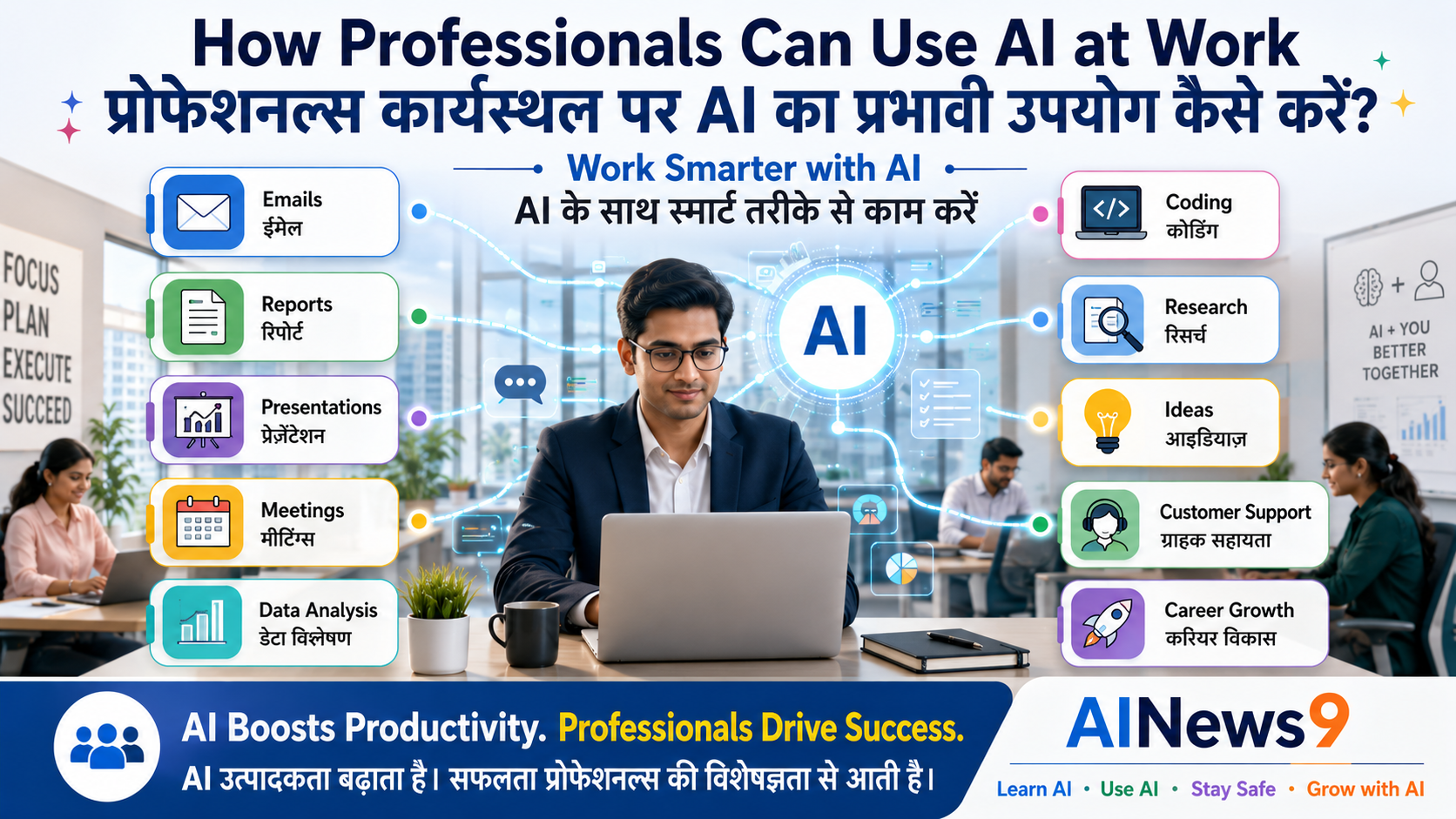
Across industries, professionals are using AI to write emails, summarize meetings, analyze data, prepare presentations, automate repetitive tasks, brainstorm ideas, and improve productivity. Whether you work in IT, finance, HR, marketing, sales, healthcare, education, or operations, AI has the potential to transform the way you work.
But AI is not here to replace professionals.
Instead, it acts as a powerful workplace assistant that helps you work faster, make better decisions, and focus on high-value tasks that require creativity, critical thinking, and human judgment.
In this practical guide, you’ll learn how professionals can use AI effectively, responsibly, and ethically to improve their daily work while preparing for an AI-enabled future.
👥 Who Should Read This
This guide is ideal for:
- Corporate professionals
- Software engineers
- Managers and team leaders
- HR professionals
- Marketing professionals
- Finance professionals
- Sales executives
- Business analysts
- Consultants
- Entrepreneurs
- Government employees
- Anyone who wants to become more productive at work
No technical background is required.
📖 What You’ll Learn
By the end of this guide, you will be able to:
- Understand how AI is changing modern workplaces.
- Use AI to improve daily productivity.
- Write better emails, reports, and presentations.
- Conduct research faster.
- Automate repetitive tasks.
- Learn responsible AI practices at work.
- Discover AI tools used by professionals across industries.
📚 In This Guide
🚀 Why Every Professional Should Learn AI
The workplace is evolving rapidly.
Just as computers, email, spreadsheets, and the internet transformed offices over the past three decades, Artificial Intelligence is becoming the next major productivity revolution.
Today, professionals across the world are using AI to:
- Draft emails in seconds.
- Summarize lengthy documents.
- Prepare presentations.
- Generate meeting notes.
- Analyze large datasets.
- Brainstorm innovative ideas.
- Create reports.
- Automate repetitive work.
- Improve communication.
Learning AI is no longer limited to software developers or data scientists.
It is becoming a valuable skill for professionals in almost every industry.
Organizations increasingly expect employees to work efficiently, collaborate effectively, and make data-driven decisions. AI can support all of these goals.
The professionals who thrive in the coming years will not necessarily be those who know the most about AI—but those who know how to use AI responsibly to enhance their work.
💼 AI as Your Workplace Assistant
Many professionals worry that AI will replace jobs.
In reality, AI is best viewed as a highly capable workplace assistant.
Think about your daily routine.
How much time do you spend:
- Writing emails?
- Creating reports?
- Searching for information?
- Preparing presentations?
- Taking meeting notes?
- Formatting documents?
- Brainstorming ideas?
These repetitive tasks consume valuable time that could be spent solving business problems, collaborating with colleagues, or engaging with customers.
AI helps reduce routine work while allowing professionals to focus on activities that require human expertise.
For example, instead of spending an hour creating the first draft of a project proposal, you can ask AI to generate a structured outline in minutes.
You remain responsible for reviewing, refining, and approving the final document.
💡 Professional Tip
Treat AI as your first-draft assistant. Let AI handle routine work while you add expertise, judgment, and business context.
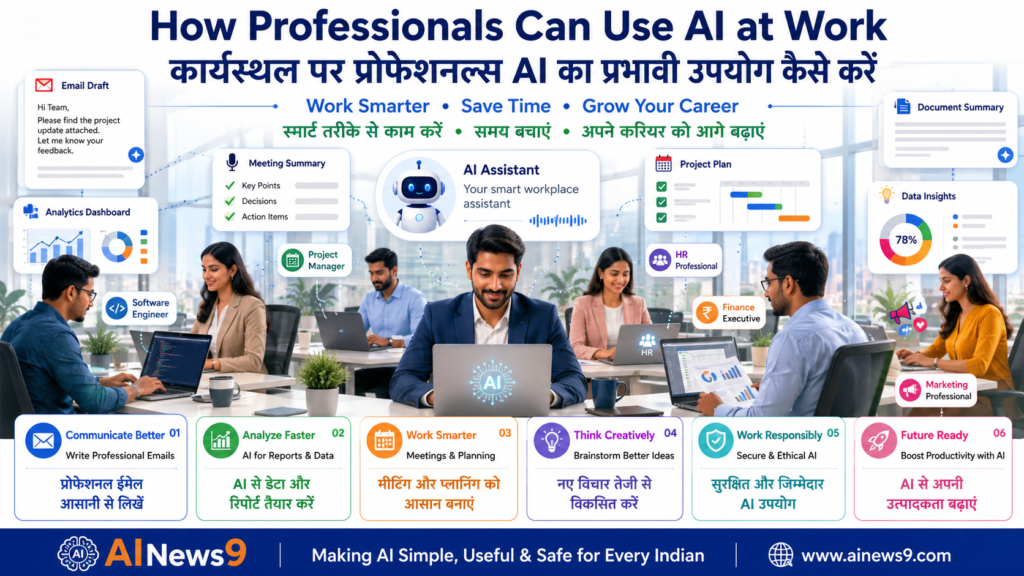
📈 Practical Ways Professionals Can Use AI
Artificial Intelligence can support almost every stage of a professional’s daily workflow.
From communication and documentation to planning and decision-making, AI enables professionals to work more efficiently without compromising quality.
Let’s explore some of the most practical applications.
Writing Professional Emails
Email remains one of the most common forms of workplace communication.
AI can help professionals:
- Draft emails.
- Improve grammar.
- Adjust tone.
- Rewrite messages.
- Summarize long email threads.
- Create follow-up emails.
Instead of starting from a blank page, professionals can use AI to generate a high-quality draft and then personalize it.
Example Prompt
“Write a professional email to a client explaining that the project delivery has been delayed by one week due to additional quality testing. Maintain a polite and confident tone.”
AI saves time while helping improve communication quality.
Creating Reports and Documentation
Preparing reports often involves organizing information, summarizing findings, and presenting recommendations.
AI can assist with:
- Project reports.
- Weekly status reports.
- Executive summaries.
- Standard Operating Procedures (SOPs).
- Meeting documentation.
- Business proposals.
- Process documentation.
Professionals should always verify facts, business data, and conclusions before sharing AI-generated documents.
💡 Professional Tip
AI creates excellent first drafts—but business decisions should always be based on verified information and professional judgment.
Summarizing Meetings
Professionals attend numerous meetings every week.
AI can help transform lengthy meeting notes into:
- Key discussion points.
- Action items.
- Decisions taken.
- Pending tasks.
- Follow-up responsibilities.
- Executive summaries.
This improves collaboration while reducing the time spent documenting meetings.
Example Prompt
“Summarize these meeting notes into key decisions, action items, owners, and deadlines in a professional format.”
Creating Presentations
Preparing presentations often takes several hours.
AI can help generate:
- Presentation outlines.
- Speaker notes.
- Slide content.
- Executive summaries.
- Charts and diagrams.
- Visual storytelling ideas.
Professionals can then customize the presentation according to their audience and business objectives.
Conducting Research
Whether preparing for a client meeting, understanding market trends, or learning a new technology, research consumes significant time.
AI helps professionals:
- Summarize articles.
- Compare products.
- Explain complex topics.
- Generate research questions.
- Organize information.
- Create concise summaries.
While AI accelerates research, important information should always be verified using trusted and authoritative sources.
Analyzing Data More Efficiently
Modern workplaces generate enormous amounts of data.
Sales reports, customer feedback, financial records, operational metrics, project dashboards, and survey responses all contain valuable insights.
AI can help professionals:
- Identify trends.
- Summarize large datasets.
- Explain charts.
- Compare performance.
- Highlight anomalies.
- Generate business insights.
Instead of manually reviewing hundreds of rows in a spreadsheet, professionals can ask AI to explain the important findings in simple language.
Example Prompt
“Analyze this monthly sales data and identify the top three trends, major risks, and business opportunities.”
Remember, AI assists with analysis—but business decisions should always be based on verified data and professional judgment.
Brainstorming Ideas and Solving Problems
Every professional faces situations that require creative thinking.
Whether launching a new product, improving customer experience, planning a project, or solving operational challenges, brainstorming often takes time.
AI can become a valuable thinking partner by generating:
- Business ideas
- Marketing campaigns
- Product improvements
- Risk mitigation strategies
- Process improvement suggestions
- Innovation ideas
- Customer engagement concepts
Instead of replacing creativity, AI expands the number of ideas you can explore.
💡 Professional Tip
Ask AI for multiple perspectives before making important business decisions. Diverse ideas often lead to better solutions.
Project Planning and Task Management
Planning projects involves organizing activities, assigning responsibilities, identifying risks, and tracking progress.
AI can assist by preparing:
- Project plans
- Work Breakdown Structures (WBS)
- Risk registers
- Milestone plans
- Meeting agendas
- Task lists
- Project timelines
- Status reports
Professionals can then refine these plans based on business priorities and organizational requirements.
Example Prompt
“Create a 12-week project plan for implementing a new CRM system, including milestones, risks, deliverables, and stakeholder communication.”
Automating Repetitive Work
Many workplace activities are repetitive but necessary.
AI can help automate tasks such as:
- Drafting routine emails
- Formatting documents
- Creating meeting summaries
- Preparing status reports
- Organizing notes
- Writing standard responses
- Generating checklists
- Preparing first drafts of documentation
Automation allows professionals to spend more time on strategic work rather than administrative tasks.
Improving Presentations and Communication
Strong communication is one of the most valuable workplace skills.
AI can help professionals:
- Simplify complex ideas.
- Improve business writing.
- Create executive summaries.
- Rewrite technical documents.
- Generate presentation content.
- Improve clarity and readability.
Professionals should always review AI-generated communication to ensure it reflects their organization’s tone, culture, and objectives.
🏢 AI Across Different Professions
Artificial Intelligence is useful across almost every industry.
Here are a few examples.
| Profession | How AI Can Help |
|---|---|
| Software Engineer | Code explanations, debugging assistance, documentation, test case generation |
| HR Professional | Job descriptions, interview questions, policy drafts, onboarding documents |
| Marketing Professional | Campaign ideas, social media posts, content writing, customer analysis |
| Finance Professional | Report summaries, financial analysis, forecasting support, documentation |
| Sales Professional | Proposal drafting, customer emails, sales presentations, follow-up communication |
| Project Manager | Project planning, meeting summaries, risk registers, stakeholder communication |
| Business Analyst | Requirement documentation, workflow analysis, report generation |
| Customer Support | Response templates, FAQ creation, knowledge base content |
| Healthcare Professional | Patient education material, administrative documentation (while protecting patient privacy) |
| Educator | Lesson planning, presentations, assessments, learning resources |
These examples demonstrate that AI is becoming a productivity tool across industries—not just in technology companies.
Learning New Skills Faster
Continuous learning is essential for professional growth.
AI can act as a personal learning assistant by helping professionals:
- Understand new technologies.
- Explain technical concepts.
- Summarize books.
- Create learning plans.
- Prepare certification study guides.
- Practice interview questions.
- Learn industry terminology.
Instead of spending hours searching for information, professionals can quickly build a structured learning roadmap.
Preparing for Meetings
Before important meetings, professionals often need to review large amounts of information.
AI can help prepare:
- Meeting agendas.
- Discussion points.
- Background summaries.
- Client profiles.
- Industry overviews.
- Questions to ask.
- Follow-up action plans.
Better preparation leads to more productive meetings and stronger professional communication.
Supporting Decision Making
AI can organize information, compare options, and summarize available evidence.
For example, AI can help compare:
- Software products.
- Vendor proposals.
- Business strategies.
- Market trends.
- Customer feedback.
- Project risks.
However, AI should never make the final decision.
Business decisions require human judgment, experience, ethics, and organizational context.
Daily Productivity Workflow with AI
Many professionals wonder how AI fits into a normal working day.
A practical workflow might look like this:
| Time | AI Support |
|---|---|
| Morning | Prioritize emails, summarize meetings, create daily task list |
| Before Meetings | Prepare agenda, research participants, summarize background information |
| During Work | Draft documents, analyze data, brainstorm ideas |
| Afternoon | Create reports, presentations, and status updates |
| End of Day | Summarize completed work, prepare follow-up emails, plan tomorrow’s priorities |
AI supports productivity throughout the day while allowing professionals to focus on high-value work.
💡 AINews9 Smart Tip
The quality of AI responses depends largely on the quality of your instructions.
Instead of asking:
“Write a report.”
Try asking:
“Prepare a one-page executive summary of this quarterly sales report for senior management. Highlight key achievements, major risks, recommendations, and next steps using professional business language.”
Providing context, audience, purpose, and expected format helps AI generate workplace-ready content that requires less editing.
⚠️ Responsible AI Usage at Work
Artificial Intelligence can significantly improve workplace productivity, but professionals must use it responsibly.
Every organization has its own policies regarding confidentiality, intellectual property, customer information, and data security. AI should always be used in a way that protects business interests while maintaining professional ethics.
The most successful professionals will not simply use AI—they will use it responsibly, securely, and intelligently.
Protect Confidential Business Information
One of the biggest risks of using public AI tools is sharing confidential information.
Professionals should never enter:
- Customer information
- Financial reports
- Business strategies
- Source code (unless approved)
- Product roadmaps
- Legal documents
- Personal employee information
- Passwords or API keys
- Confidential presentations
- Proprietary company data
Always follow your organization’s AI usage policy before using AI tools for work-related tasks.
💡 Professional Tip
If you’re unsure whether information is confidential, treat it as confidential and avoid sharing it with public AI systems.
Verify AI-Generated Information
AI is capable of generating impressive responses, but it can occasionally produce:
- Incorrect facts
- Outdated information
- Fabricated references
- Misinterpreted business data
- Inaccurate calculations
- Incomplete analysis
Professionals should always verify important information before using it in:
- Client presentations
- Business proposals
- Reports
- Financial analysis
- Legal documentation
- Executive communication
AI should assist your thinking—not replace professional verification.
Respect Copyright and Intellectual Property
AI can help create documents, presentations, images, and content.
However, professionals should:
- Respect copyright laws.
- Follow organizational policies.
- Avoid plagiarism.
- Give credit where required.
- Review AI-generated content before publishing.
Responsible AI usage protects both individuals and organizations.
Follow Organizational AI Policies
Many organizations are introducing AI governance frameworks.
Professionals should:
- Understand company AI policies.
- Use approved AI tools.
- Follow security guidelines.
- Protect customer privacy.
- Maintain professional ethics.
- Report AI-related concerns when necessary.
Using AI responsibly builds trust among colleagues, customers, and leadership.
🚫 Common Workplace AI Mistakes
Many professionals are excited about AI, but beginners often make similar mistakes.
Avoiding these common pitfalls helps you use AI more effectively and responsibly.
| ❌ Common Mistake | ✅ Better Practice |
|---|---|
| Copying AI responses without reviewing them | Always verify facts and customize the content |
| Sharing confidential company information | Protect sensitive business data |
| Believing every AI answer | Cross-check important information with trusted sources |
| Using vague prompts | Provide context, audience, purpose, and expected format |
| Depending entirely on AI | Combine AI assistance with your professional expertise |
| Ignoring company AI policies | Follow organizational guidelines and security practices |
Remember:
AI supports professional judgment—it does not replace it.
🌟 Best AI Tools for Professionals
Different AI tools serve different workplace needs.
| AI Tool | Best Use |
|---|---|
| ChatGPT | Writing, brainstorming, documentation, research |
| Microsoft Copilot | Microsoft 365 productivity, Word, Excel, PowerPoint |
| Google Gemini | Research, Google Workspace, collaboration |
| Claude | Long-form writing, document analysis |
| NotebookLM | Organizing notes, learning, document summaries |
| Perplexity AI | Research with source references |
| Canva AI | Business presentations, marketing visuals |
| Gamma | AI-powered presentations |
| Grammarly AI | Grammar improvement and business writing |
| Notion AI | Project documentation and knowledge management |
Select tools that align with your organization’s policies and business requirements.
🌍 Real Workplace Examples
Across industries, professionals are already using AI every day.
Examples include:
- A software engineer generating unit test cases and improving documentation.
- A project manager creating meeting summaries and project timelines.
- An HR manager preparing interview questions and onboarding material.
- A marketing executive developing campaign ideas and social media content.
- A finance analyst summarizing quarterly reports and identifying business trends.
- A consultant creating executive presentations for clients.
- A customer support executive drafting response templates for common enquiries.
These examples demonstrate that AI enhances productivity across diverse professions.
📝 Key Takeaways
Congratulations! You’ve completed another important milestone in your AI journey.
Here are the key lessons from this guide:
- ✅ AI is a workplace assistant—not a replacement for professionals.
- ✅ AI helps improve productivity by automating repetitive tasks.
- ✅ Professionals can use AI for writing, research, presentations, analysis, planning, and communication.
- ✅ Human judgment remains essential for business decisions.
- ✅ Confidential company information should never be shared with public AI tools.
- ✅ AI-generated content should always be reviewed and verified.
- ✅ Learning AI today helps professionals stay relevant in tomorrow’s workplace.
❓ Frequently Asked Questions
1. Will AI replace my job?
Not necessarily.
AI is more likely to automate repetitive tasks than replace entire professions. Professionals who learn to work effectively with AI are likely to have an advantage.
2. Can I use AI at work?
Yes, provided you follow your organization’s AI usage policies and avoid sharing confidential information with public AI tools.
3. Which AI tool is best for professionals?
It depends on your work.
ChatGPT, Microsoft Copilot, Google Gemini, Claude, NotebookLM, and Perplexity AI all serve different professional needs.
4. Can AI improve workplace productivity?
Absolutely.
AI can reduce time spent on documentation, communication, research, planning, and repetitive administrative work.
5. Is AI safe for office use?
AI can be used safely when professionals:
- Protect confidential information.
- Verify important outputs.
- Follow company policies.
- Use approved AI tools.
6. Do I need technical knowledge to use AI?
No.
Most modern AI tools are designed for everyday users and require only clear instructions written in natural language.
📚 Trusted Resources for Further Learning
To continue developing your AI workplace skills, explore these trusted resources:
- Microsoft Learn – Learn how AI enhances workplace productivity using Microsoft tools.
- IBM SkillsBuild – Free AI and digital skills courses for professionals.
These trusted resources complement this lesson and help professionals continue building practical AI skills.
💬 Final Thoughts
Every major technological shift has created new opportunities for people willing to learn.
Computers changed the workplace.
The internet changed communication.
Cloud computing changed collaboration.
Artificial Intelligence is now changing how professionals work.
The goal is not to compete with AI.
The goal is to become a professional who knows how to work with AI.
Organizations will continue valuing professionals who combine technical knowledge, business understanding, creativity, communication, ethics, and AI literacy.
Learn continuously.
Adapt confidently.
Use AI responsibly.
And remember:
The future belongs to professionals who combine human intelligence with Artificial Intelligence.
🎓 Continue Your AI Journey
Continue strengthening your AI skills with these AINews9 lessons.
Learn AI
- L005 – What is ChatGPT?
- L006 – What are AI Agents?
- L007 – What is Prompt Engineering?
- L008 – How Does AI Work?
Use AI
- U001 – How Students Can Use AI Effectively
- U002 – How Teachers Can Use AI in Education
- U005 – Beginner’s Guide to ChatGPT
- U006 – Beginner’s Guide to Google Gemini
Stay Safe
- S001 – AI Safety for Beginners
- S005 – AI and Data Privacy
- S006 – Safe Prompting Practices
Grow with AI
- G002 – AI Skills Every Professional Should Learn
- G006 – Future of Work in the AI Era
- G008 – AI for Business Growth
Every lesson helps you become a more productive, responsible, and future-ready professional.
🏛️ About AINews9
AINews9 is India’s AI Literacy Platform with a mission to make Artificial Intelligence Simple, Useful & Safe for Every Indian.
Through beginner-friendly lessons, practical guides, AI safety awareness, real-world examples, and responsible AI education, AINews9 empowers:
- 🎓 Students
- 👩🏫 Teachers
- 👨👩👧 Parents
- 💼 Professionals
- 👴 Senior Citizens
- 🏪 Small Businesses
Our four learning pillars guide every lesson:
- Learn AI
- Use AI
- Stay Safe
- Grow with AI
Together, let’s build an AI-literate India—one professional, one workplace, and one learner at a time.