AI and Data Privacy: How to Protect Your Personal Information
🔒 A Simple & Practical Guide to Using Artificial Intelligence Without Compromising Your Privacy
AI and Data Privacy: How to Protect Your Personal Information
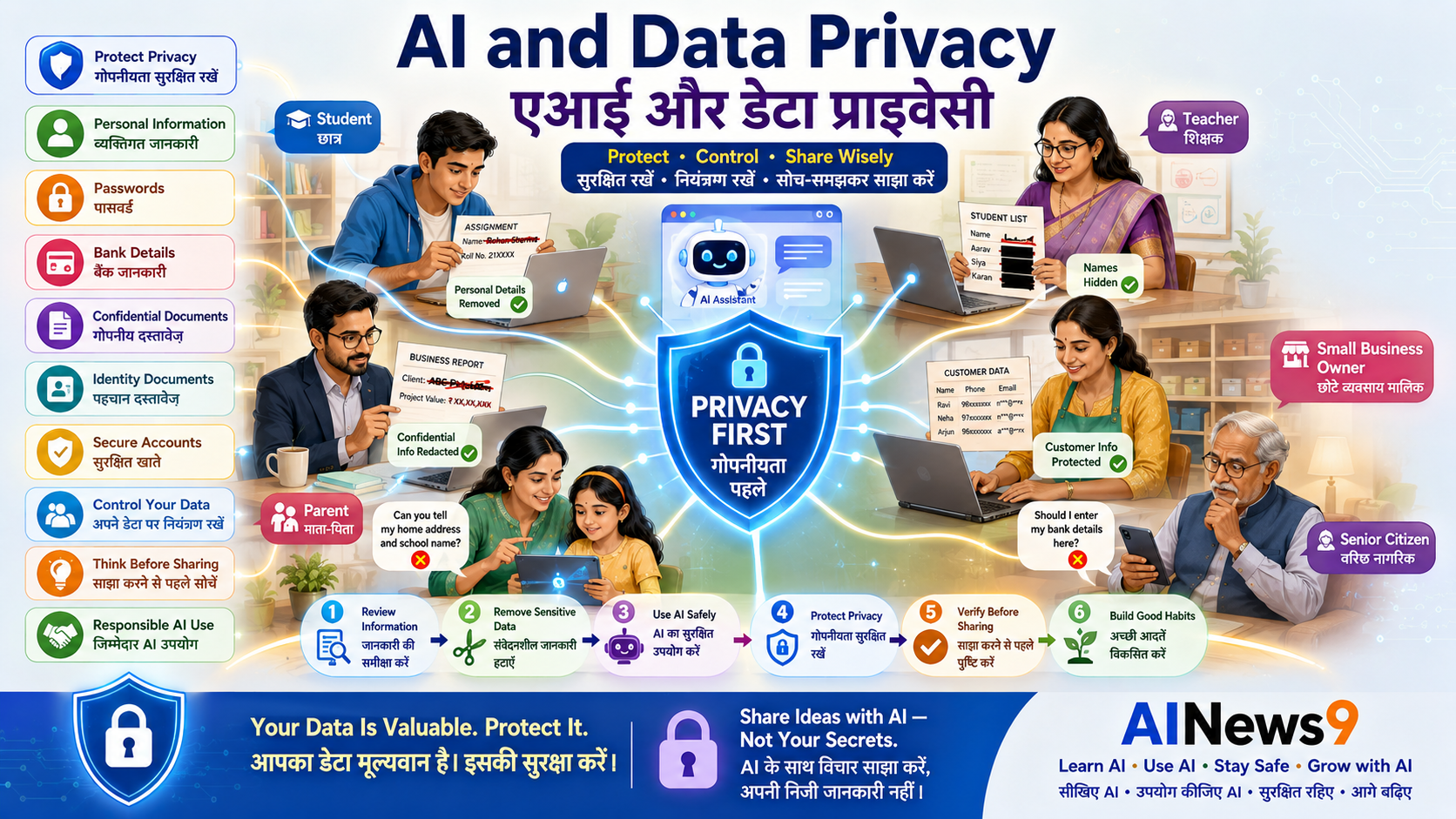
AI and Data Privacy are becoming increasingly important as more people use Artificial Intelligence for learning, work, and everyday tasks. Artificial Intelligence can help you learn, work, and solve problems more efficiently. However, like any online service, it’s important to understand what information is safe to share and what should always remain private. A few simple privacy habits can help you enjoy the benefits of AI with confidence. In this guide, you’ll learn how AI handles information, what you should never share, and practical ways to protect your personal and professional data.
👥 Who Should Read This
This guide is especially useful for:
- 🎓 Students
- 👨👩👧 Parents
- 👩🏫 Teachers
- 💼 Professionals
- 👴 Senior Citizens
- 🏪 Small Business Owners
- 🌐 Anyone using AI tools such as ChatGPT, Gemini, Claude, or Microsoft Copilot
No technical knowledge is required.
📖 What You’ll Learn
By the end of this guide, you’ll be able to:
- Understand what data privacy means in the AI era.
- Learn how AI systems use the information you provide.
- Know what information should never be shared.
- Recognize what is generally safe to share.
- Protect your personal and professional information.
- Develop simple privacy habits for everyday AI use.
📚 In This Guide
🔒 AI and Data Privacy: What Does It Mean?
Data privacy means protecting your personal and sensitive information from being accessed, shared, or misused without your knowledge or permission.
When you use an AI assistant, you often share information by:
- Typing questions or prompts
- Uploading documents
- Sharing images
- Having conversations
- Asking AI to analyse information
Understanding what to share and what not to share is one of the most important skills for using AI responsibly.
Privacy isn’t about avoiding AI.
It’s about using AI wisely while protecting your personal information.
🤖 How AI Uses Your Information
Every AI service works a little differently, but most AI tools process the information you provide in order to generate useful responses.
Depending on the service and its privacy settings, the information you enter may be:
- Processed to answer your questions.
- Stored temporarily during your session.
- Saved to your conversation history.
- Used to improve future AI models (if permitted by the service and your settings).
This is why it’s always a good idea to understand the privacy options offered by the AI platform you are using.
Before uploading sensitive information, check:
- The platform’s privacy policy.
- Whether chat history is enabled.
- Available privacy or data-control settings.
- Whether you’re using a personal or enterprise version of the AI service.
Being informed helps you make better privacy decisions.
🛡️ Privacy Check
Before entering anything into an AI tool, ask yourself:
“Would I be comfortable if this information became public?”
If the answer is No, don’t enter it into a public AI assistant.
This simple question can prevent many privacy mistakes.
🚫 What You Should NEVER Share with AI
Some information should never be entered into public AI tools.
Examples include:
🔑 Login Credentials
- Passwords
- PINs
- Security questions
- One-time passwords (OTPs)
🏦 Financial Information
- Bank account numbers
- Credit or debit card details
- UPI PINs
- Net banking credentials
- Investment account passwords
🪪 Government Identity Documents
- Aadhaar number
- PAN number
- Passport details
- Driving licence information
- Voter ID details
🏥 Sensitive Personal Information
- Medical reports
- Health records
- Insurance documents
- Tax records
- Confidential legal documents
💼 Confidential Business Information
- Customer databases
- Company financial reports
- Confidential contracts
- Product designs
- Proprietary source code
- Internal business strategies
If information could harm you, your family, your employer, or your customers if it became public, don’t share it with a public AI service.
⚠️ Safety Alert
Never share passwords, OTPs, banking details, Aadhaar numbers, confidential business documents, or customer information with public AI tools.
If you’re unsure whether something is safe to share, it’s better to leave it out.
🛡️ AINews9 Safety Tip #1
The safest AI users aren’t the ones who share the least—they’re the ones who know the difference between public information and private information.
✅ Safe Practice
Before uploading any file to an AI assistant, take a moment to review it. Remove personal details, confidential information, and anything you wouldn’t want shared outside your home, school, or workplace.
✅ What Information Is Usually Safe to Share?
One of the biggest misconceptions about AI privacy is that nothing should be shared with AI.
That’s not true.
AI is designed to help with many everyday tasks, and most general or non-sensitive information is perfectly suitable to use.
Examples include:
- Asking general knowledge questions
- Learning new skills
- Improving grammar and writing
- Brainstorming ideas
- Summarising public information
- Planning trips or events
- Practising interview questions
- Learning coding concepts
- Creating study notes
- Exploring creative ideas
As a simple rule:
If the information is already public or doesn’t identify you or someone else, it’s generally safe to use with public AI tools.
⚖️ Public Information vs Private Information
Understanding the difference between public and private information makes AI much safer to use.
| ✅ Generally Safe to Share | ❌ Never Share |
|---|---|
| Homework questions | Passwords |
| Public articles | OTPs |
| Writing ideas | Aadhaar number |
| Travel plans | PAN details |
| Recipe requests | Bank account details |
| Programming practice | Medical records |
| Public speeches | Confidential office documents |
| Creative stories | Customer databases |
Whenever you’re unsure, ask yourself:
“Could this information harm someone if it became public?”
If the answer is Yes, don’t upload it.
🛡️ Privacy Check
Before pressing Send, pause for five seconds and ask:
- Is this personal?
- Is it confidential?
- Does it belong to someone else?
- Would I share this publicly?
If any answer makes you uncomfortable, remove or anonymise the information first.
🏡 Privacy Tips for Families
Parents can help children develop healthy privacy habits from an early age.
Teach children to:
- Never share their full name unless necessary.
- Keep passwords private.
- Avoid sharing school details.
- Ask permission before uploading photos.
- Tell an adult if an AI conversation feels strange or confusing.
Family discussions about online privacy are often more effective than long lists of rules.
💼 Privacy Tips for Professionals
Professionals increasingly use AI for writing, analysis, coding, presentations, and productivity.
Before using AI at work:
- Follow your organization’s AI policy.
- Remove confidential information from documents.
- Avoid uploading customer data.
- Don’t share unpublished financial information.
- Be careful with contracts and legal documents.
Remember:
Your responsibility to protect company information doesn’t change because you’re using AI.
🏪 Privacy Tips for Small Business Owners
AI can save time and improve productivity, but business information should always be handled carefully.
Avoid uploading:
- Customer databases
- Employee records
- Pricing strategies
- Financial reports
- Supplier contracts
- Product designs
- Business plans
Instead, remove identifying details or use sample data whenever possible.
This allows you to benefit from AI while reducing privacy risks.
⚙️ Privacy Settings You Should Know
Many AI platforms provide settings that allow you to control how your information is handled.
Although options vary between services, it’s worth checking whether you can:
- Review conversation history.
- Delete previous chats.
- Manage data-sharing preferences.
- Disable model training (where available).
- Control uploaded files.
Spending a few minutes reviewing these settings can improve your privacy.
⚠️ Safety Alert
Never assume every AI platform follows the same privacy practices. Always review the settings and privacy options of the specific service you are using.
🔐 Everyday Privacy Habits
Protecting your privacy doesn’t require technical expertise.
Simple daily habits make a significant difference.
Develop these habits:
- Think before uploading files.
- Read permission requests carefully.
- Use strong, unique passwords.
- Enable Multi-Factor Authentication whenever available.
- Log out of shared devices.
- Keep your software updated.
- Review your privacy settings regularly.
Small actions today can prevent larger problems later.
🛡️ AINews9 Safety Tip #2
Privacy isn’t about hiding information—it’s about deciding who should have access to it. Good AI users stay in control of what they choose to share.
✅ Safe Practice
If you need AI to review a document, replace names, account numbers, addresses, and other identifying information with placeholders before uploading it.
For example:
- Customer Name → Customer A
- Company Name → ABC Company
- Phone Number → XXXXXXXXXX
This simple step protects privacy while still allowing AI to help.
🚫 Common Privacy Mistakes
Most privacy incidents don’t happen because AI is unsafe.
They happen because users unknowingly share more information than necessary.
Avoid these common mistakes to protect yourself.
| ❌ Common Mistake | ✅ Better Practice |
|---|---|
| Sharing passwords or OTPs | Never share login credentials with AI. |
| Uploading confidential documents | Remove sensitive information first. |
| Using office data in public AI tools | Follow your organization’s AI policy. |
| Ignoring privacy settings | Review privacy options regularly. |
| Sharing personal identity documents | Keep Aadhaar, PAN, passport, and banking details private. |
| Assuming every AI service works the same | Read the privacy policy and understand the platform you are using. |
Remember:
Good privacy isn’t about avoiding AI—it’s about making informed choices.
🌟 Best Practices for Safe AI Use
Using AI safely is easier than many people think.
By following a few practical habits, you can enjoy the benefits of AI while protecting your personal information.
✅ Think Before You Share
Before entering any information, ask:
- Is this personal?
- Is this confidential?
- Does this belong to someone else?
- Would I be comfortable if someone else saw this?
If you’re unsure, don’t upload it.
✅ Share Only What Is Necessary
Provide only the information AI needs to complete your task.
For example:
Instead of uploading an entire confidential report, copy only the public paragraph you want AI to improve.
Less information means lower privacy risk.
✅ Use Trusted AI Platforms
Whenever possible, choose well-known AI services that provide:
- Clear privacy policies
- Security controls
- Account protection
- Privacy settings
- Transparent data practices
Always download AI applications from official app stores or trusted websites.
✅ Review AI Responses Carefully
AI can generate useful suggestions, but you remain responsible for the final decision.
Always review:
- Facts
- Numbers
- Personal information
- Business content
- Legal or financial advice
AI should support your decisions—not replace your judgment.
🛡️ AINews9 Safety Tip #3
The smartest AI users don’t share more information—they share only the information that’s truly needed.
🌍 Building Healthy Privacy Habits
Privacy is not a one-time setting.
It is a habit.
Simple daily actions can greatly improve your digital safety.
Develop these habits:
- Review app permissions regularly.
- Use different passwords for important accounts.
- Enable Multi-Factor Authentication.
- Update software promptly.
- Keep learning about online safety.
- Talk with family members about digital privacy.
Small habits practiced consistently provide strong long-term protection.
📝 Key Takeaways
Congratulations!
You now understand how to use Artificial Intelligence while protecting your personal and professional information.
Here are the most important lessons to remember:
- ✅ Understand the difference between public and private information.
- ✅ Never share passwords, OTPs, banking details, or identity documents with public AI tools.
- ✅ Remove confidential information before uploading documents.
- ✅ Review privacy settings on the AI platforms you use.
- ✅ Follow your organization’s AI policies.
- ✅ Think before you share.
- ✅ Stay informed as AI technology continues to evolve.
❓ Frequently Asked Questions
1. Is it safe to use AI tools?
Yes.
Most AI tools are safe to use for general learning, writing, brainstorming, and productivity when used responsibly.
The key is avoiding the sharing of sensitive personal or confidential information.
2. Should I upload confidential office documents?
No.
Unless your organization specifically approves it and provides a secure AI platform, avoid uploading confidential business information to public AI services.
3. Is it safe to upload personal photographs?
Think carefully before uploading personal photos.
Only use trusted platforms and understand how your images may be stored or processed.
4. Can AI access my bank account?
No.
AI cannot access your bank account unless you voluntarily provide sensitive financial information or authorize a connected service.
Never share banking passwords, PINs, or OTPs.
5. What information should I never share with AI?
Avoid sharing:
- Passwords
- OTPs
- Aadhaar number
- PAN details
- Passport information
- Banking details
- Medical records
- Confidential office documents
- Customer information
6. How can professionals use AI safely?
Remove confidential information before uploading documents, follow company policies, and use approved AI platforms whenever available.
7. How can parents teach children about AI privacy?
Teach children to:
- Keep personal information private.
- Ask before uploading photos or documents.
- Verify information.
- Tell a trusted adult if something online feels unusual.
8. What is the simplest privacy rule to remember?
Remember this question:
“Would I be comfortable if this information became public?”
If the answer is No, don’t share it with a public AI assistant.
📚 Trusted Resources
To learn more about AI privacy and responsible AI use, explore these trusted resources:
- National Cyber Security Awareness Resources
- Google Safety Center
- Microsoft Responsible AI
- OpenAI Safety & Privacy Resources
- UNESCO – Guidance on Generative AI
- AINews9 Stay Safe Series
Always refer to the official privacy policy of the AI platform you are using before sharing important information.
💬 Final Thoughts
Artificial Intelligence is becoming an everyday tool for learning, work, creativity, and productivity.
Like any digital technology, using it wisely means understanding both its benefits and your responsibilities.
Protecting your privacy doesn’t require advanced technical knowledge.
By thinking before you share, protecting sensitive information, reviewing privacy settings, and staying informed, you can confidently use AI while keeping your personal and professional information secure.
Remember:
Privacy is one of your most valuable digital assets. Protect it with the same care you would protect your home, your wallet, or your identity.
Responsible AI begins with responsible information sharing.
🎓 Continue Your AI Journey
Continue building your AI knowledge with AINews9.
📘 Learn AI
- L001 – What is Artificial Intelligence?
- L002 – What is Generative AI?
- L003 – What is Machine Learning?
- L004 – What are Large Language Models (LLMs)?
- L005 – What is ChatGPT?
- L006 – What are AI Agents?
- L007 – What is Prompt Engineering?
- L008 – How Does AI Work?
- L009 – History of Artificial Intelligence
- L010 – AI Terminology Explained
🛠️ Use AI
- U001 – How Students Can Use AI Effectively
- U002 – How Teachers Can Use AI in Education
- U003 – How Professionals Can Use AI at Work
- U004 – How Small Businesses Can Use AI
- U005 – Beginner’s Guide to ChatGPT
- U006 – Beginner’s Guide to Gemini
- U007 – Beginner’s Guide to Claude
- U008 – Beginner’s Guide to NotebookLM
- U009 – AI for Everyday Productivity
- U010 – 10 Best AI Tools for Beginners
🛡️ Stay Safe
- S001 – AI Safety for Beginners
- S002 – What Are Deepfakes?
- S003 – AI Scams and How to Avoid Them
- S004 – AI Safety for Children & Parents
- S005 – AI and Data Privacy: How to Protect Your Personal Information ✅
- S006 – Safe Prompting Practices
- S007 – Responsible AI Use
- S008 – AI Ethics Explained
- S009 – AI Misinformation
- S010 – AI Safety Checklist
About AINews9
AINews9 is India’s AI Literacy Platform with a mission to make Artificial Intelligence Simple, Useful & Safe for Every Indian.
We empower:
- 🎓 Students
- 👩🏫 Teachers
- 👨👩👧 Parents
- 💼 Professionals
- 👴 Senior Citizens
- 🏪 Small Business Owners
Through our four learning pillars:
- 📘 Learn AI
- 🛠️ Use AI
- 🛡️ Stay Safe
- 🚀 Grow with AI
Together, we’re helping every Indian build the knowledge and confidence to use Artificial Intelligence responsibly, securely, and productively.